
How to Set Up a Claude AI Project for Your Company: The Complete Guide
Most companies using Claude AI are getting maybe 20% of what it’s capable of delivering. They’re using it like a chatbot — paste a question, get an answer, close the tab. There’s no memory, no structure, no repeatable workflow. Every session starts from zero.
That changes the moment you set up a proper Claude Code project. With the right folder structure, model selection, and workflow files in place, Claude stops being a fancy search engine and starts functioning like a senior team member who knows your business, your standards, and your goals — every single session.
This guide walks through the complete Claude AI company project setup: what files you need, how to structure your folders, which Claude model to use for which tasks, and the exact quick-start prompt to get your whole operation running in hours, not weeks.
Why Project Structure Changes Everything
When you give Claude a well-structured project, you’re not just organizing files. You’re building persistent context that compounds over time.
Without structure, every conversation is isolated. Claude doesn’t know your brand voice, your target audience, your content rules, or your business goals — because you never told it in a way that carries forward. You end up re-explaining the same context over and over, and you get generic output in return.
With structure, you define all of that once. Your CLAUDE.md holds your business context. Your memory.md stores what Claude needs to remember between sessions. Your rules.md sets the non-negotiables. Your workflows/ folder captures exactly how each repeatable task gets done. Claude reads all of it at the start of every session and immediately operates at the level of someone who’s been on your team for months.
For agencies, content teams, and growing businesses, this isn’t a productivity hack — it’s a competitive advantage.

The Recommended Folder Architecture
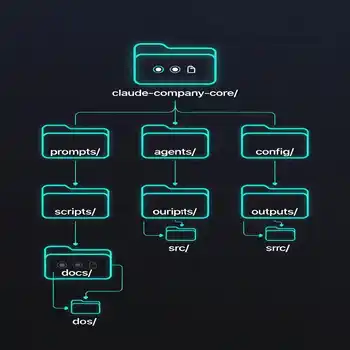
The foundation of a well-run Claude AI project is a clean, logical folder structure. Here’s the recommended layout that works for companies of any size:
/company-name/
├── CLAUDE.md
├── README.md
├── PROJECT_ROADMAP.md
├── BUSINESS_OVERVIEW.md
├── BRAND_GUIDELINES.md
├── MODEL_SELECTION.md
├── .claude/
│   ├── settings.json
│   ├── memory.md
│   ├── context.md
│   └── rules.md
├── commands/
├── prompts/
├── knowledge/
├── workflows/
├── seo/
├── content/
├── sales/
├── development/
├── qa/
└── reports/
Each folder has a specific job. The commands/ folder holds markdown files for repeatable tasks — things you do weekly or daily that should always follow the same process. The workflows/ folder captures multi-step processes from start to finish. The knowledge/ folder stores reference material Claude should always have access to: your product catalog, competitor research, customer personas, or industry glossaries.
The seo/, content/, sales/, and development/ folders separate your functional work areas, keeping outputs organized and making it easy for multiple team members to work within the same project without stepping on each other.

Choosing the Right Claude Model for Each Task
One of the most overlooked decisions in any Claude AI setup is model selection. Not every task needs the same model — and using the most powerful model for everything wastes both time and budget. Here’s how to think about it:
Claude Opus — Strategic Planning and Competitive Intelligence
Use Opus for the work that requires the deepest reasoning: business strategy, competitive analysis, architectural decisions, long-range planning, and complex problem-solving where nuance matters. Opus is the model you bring in when the stakes are high and you need thinking that goes several layers deep.
In practice: quarterly strategy documents, campaign architecture, market analysis, product roadmaps, and anything where a wrong call costs real money.
Claude Sonnet — Daily Production Work
Sonnet is your workhorse. It handles content creation, coding, SEO optimization, client communications, research, and the bulk of day-to-day execution with excellent quality and fast turnaround. For most teams, Sonnet handles 80% or more of total Claude usage.
In practice: blog posts, email drafts, social content, code reviews, briefing documents, and standard workflow execution.
Claude Haiku — Bulk Processing and Classification
When you need to process large volumes of content quickly — summarizing batches of articles, classifying leads, tagging content, or generating short-form output at scale — Haiku delivers fast results at the lowest cost. It’s not for nuanced work, but for high-volume, structured tasks it’s the right tool.
In practice: content tagging, lead scoring, bulk summarization, data classification, and any task where you’re running the same operation hundreds of times.
Document your model selection decisions in a MODEL_SELECTION.md file in your project root. As your workflows mature, you’ll want a clear record of why specific tasks are routed to specific models — especially when onboarding new team members or handing off to contractors.
The Essential Files Every Project Needs
The files in your .claude/ folder and your project root define how Claude shows up in every session. Get these right and everything else becomes much easier.
CLAUDE.md — Your Central Command File
This is the most important file in your project. CLAUDE.md is loaded automatically by Claude Code at the start of every session. It should contain your company context, your primary goals, your content standards, your key URLs, and any standing instructions that apply to all work done within this project.
Think of it as the onboarding document you’d give a new senior employee on day one. Include: who the company is, what you’re trying to achieve, what the rules are, and where to find everything else.
memory.md — Persistent Business Knowledge
Your memory.md file stores facts that Claude should always know but that don’t change session to session: your team structure, client roster, active campaigns, brand voice notes, and any standing context that would otherwise need to be re-explained each time.
Update this file whenever something important changes — a new client, a shifted strategy, a completed campaign. It’s living documentation, not a one-time setup.
rules.md — Non-Negotiable Standards
This file holds the hard rules. Things Claude should never do, always do, or always check before completing any task. Common examples: never publish without an internal link, always optimize meta descriptions, never use competitor brand names, always match the house style guide.
Keep it short and specific. Long rules files get ignored. Tight, precise rules get followed.
Commands and Workflows That Scale
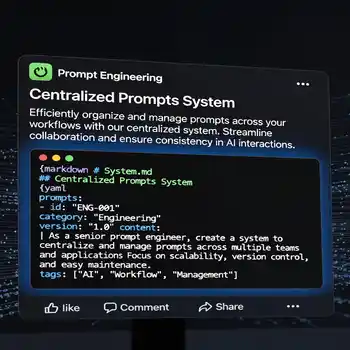
The difference between a Claude AI setup that saves you an hour a week and one that transforms your entire operation usually comes down to commands and workflows.
Commands: Repeatable Tasks Made Instant
A command file is a markdown document in your commands/ folder that captures exactly how a specific repeatable task should be done. When you run that command, Claude follows the documented process every time — same structure, same quality standards, same output format.
Examples of commands worth building:
publish-blog-post.md— Full checklist from draft to published: SEO check, internal links, meta description, featured image, categories, tags.weekly-seo-report.md— Pulls ranking data, flags drops, summarizes wins, formats for the client.new-client-onboard.md— Generates the brief, sets up the folder, creates the first deliverables.social-content-batch.md— Takes one blog post and produces a week of social content across platforms.
Workflows: Multi-Step Processes End-to-End
Workflows go deeper than commands. They capture an entire process from brief to delivery, including decision points, quality checks, and handoffs. A content workflow might start with keyword research, move through outline creation, drafting, SEO optimization, internal link injection, and final review before publishing.
Document your workflows in workflows/*.md files. The more precisely you document them, the more consistently Claude executes them — and the easier it becomes to hand them off to other team members or contractors who are new to the system.
8 Best Practices for a Production-Ready Claude AI Project
Once your structure is in place, these practices keep it running at a high level over time:
- Keep prompts modular. Write prompts that do one thing well. Combining multiple objectives into a single prompt usually produces mediocre results on all of them.
- Store reusable context in memory files. Anything you find yourself explaining more than once belongs in
memory.mdorcontext.md, not in the conversation. - Use commands for repeatable tasks. If you’ve done it twice, document it. If you’ve done it five times, it should be a command file.
- Separate strategy, execution, and QA. Don’t mix your planning prompts with your production prompts. Keep them in separate files with clear purpose.
- Document model selection. Every time you decide which model handles which task, write it down in
MODEL_SELECTION.md. Future you — and your team — will thank you. - Standardize outputs. Define what a “finished” deliverable looks like for each task type. Consistent output format makes review, editing, and publishing dramatically faster.
- Build workflows that scale. Design every workflow as if someone who’s never seen it before will be running it. If it only works when you’re the one doing it, it doesn’t scale.
- Review and update prompts regularly. Models improve. Your business evolves. Set a monthly reminder to review your core prompts and update anything that’s drifted from how you actually work.
The Quick-Start Prompt
Ready to build your project? Use this prompt to have Claude Code generate your complete company project structure in one session:
Create a complete Claude Code project for:
Company Name: [YOUR COMPANY NAME]
Website: [YOUR URL]
Industry: [YOUR INDUSTRY]
Services: [YOUR SERVICES]
Target Audience: [YOUR AUDIENCE]
Goals: [YOUR GOALS]Generate the full folder structure, all README files, CLAUDE.md, memory files, commands, prompts, workflows, and templates. For each file, specify the best Claude model to use.
Fill in your specifics, run it in Claude Code, and you’ll have a production-ready project scaffold to build on. From there it’s a matter of populating the files with your actual business context — something that takes a few focused hours and pays dividends for as long as you run the system.
Which Companies Should Do This First?
Every company using Claude AI benefits from proper project structure, but three types of operations see the fastest returns:
Digital marketing agencies running content and SEO for multiple clients gain consistency across accounts, faster onboarding of new clients, and dramatically reduced time per deliverable. Each client gets their own project folder with their own context, rules, and workflows.
AI-focused content publishers — like this site — use Claude project structure to maintain publishing velocity without sacrificing quality. When your entire content operation runs off documented workflows and commands, you can scale output without scaling headcount.
B2B companies with active sales and marketing operations get the most from the commands and workflows approach: automated reporting, consistent proposal generation, content that always reflects current positioning.
Get Your Claude AI System Built Right
Setting up the structure is straightforward. The harder part is populating it with the right context, rules, and workflows for your specific business — and knowing which parts to prioritize first.
Innovex Ventures builds these systems for companies that want Claude AI operating at full capability from day one. If you’d rather get it done right than figure it out through trial and error, get in touch.
Claude AI company project setup Related reading:
AI Prompts for SEO Growth
Anthropic Is Winning the Enterprise AI Race — The Data Proves It
Frequently Asked Questions (FAQ): Claude AI Company Project Setup
What is a Claude AI project?
A Claude AI project is a structured workspace that contains your company context, workflows, prompts, and rules. Instead of treating Claude as a simple chatbot, a project allows Claude to operate with persistent business knowledge and standardized processes.
Why should my company use a structured Claude AI project?
A structured project transforms Claude into a repeatable business system. It helps your company:
Maintain consistent brand voice
Automate content creation
Streamline SEO and marketing workflows
Organize knowledge and research
Reduce repetitive prompting
Scale operations efficiently
What is Claude Code?
Claude Code is Anthropic’s developer-focused environment for building structured AI projects. It allows you to create folders, markdown files, commands, and workflows that Claude automatically reads during each session.
What is the most important file in a Claude project?
The most important file is CLAUDE.md. It acts as the central command file and includes:
Company overview
Business goals
Brand voice
Key URLs
Project instructions
References to other files
What does memory.md do?
The memory.md file stores long-term business information Claude should remember across sessions, such as:
Client names
Active campaigns
Customer personas
Team roles
Ongoing projects